
Put on [Resource Type] [Resource Name] Failed with 1 faulted referenced [Resource Type](s)
This error can occur when you’re trying to deploy a change to an Azure network resource, but its provisioning state, or one of its dependencies, is “Failed”. Should I start panicking now? Why does this happen? And how do I fix it?
This is Part 1 of a series of posts regarding this issue.
The provisioning state is “Failed”! Should I be worried?
As explained in Troubleshoot Azure Microsoft.Network failed provisioning state;
These states are metadata properties of the resource. They’re independent from the functionality of the resource itself. Being in the failed state doesn’t necessarily mean that the resource isn’t functional. In most cases, it can continue operating and serving traffic without issues.
OK, panic over, but…
What’s the cause of this?
There are different reasons why this can occur that seem to vary depending on the resource type, whether it be an IP Group, Azure Firewall Policy, Azure Firewall etc.
For Azure Firewall, I recently found this can occur if you attempt to push changes to IP Groups in parallel. This is a known issue, which can be found Azure Firewall known issues and limitations. Fortunately, there is a feature that is currently in preview to support parallel IP Group updates, although I’m not sure how a CI/CD will know to limit parallel updates to a specific number.
So, how do I fix it?
For resources in a Failed provisioning state, you can Restore succeeded state through a PUT operation.
The easiest way to achieve this task is to use Azure PowerShell. Issue a resource-specific Get command that fetches all the current configuration for the resource. Next, run a Set command, or equivalent, to commit to Azure a write operation that contains all the resource properties as currently configured.
You can find a list of Azure PowerShell cmdlets to restore succeeded provisioning state.
Didn’t you say something about dependencies?
That’s right. If you have several resources that are “chained” in some way then you may find that one or more of them have a Failed provisioning state.
A recent customer of mine experienced this where they had multiple resources chained together like so;
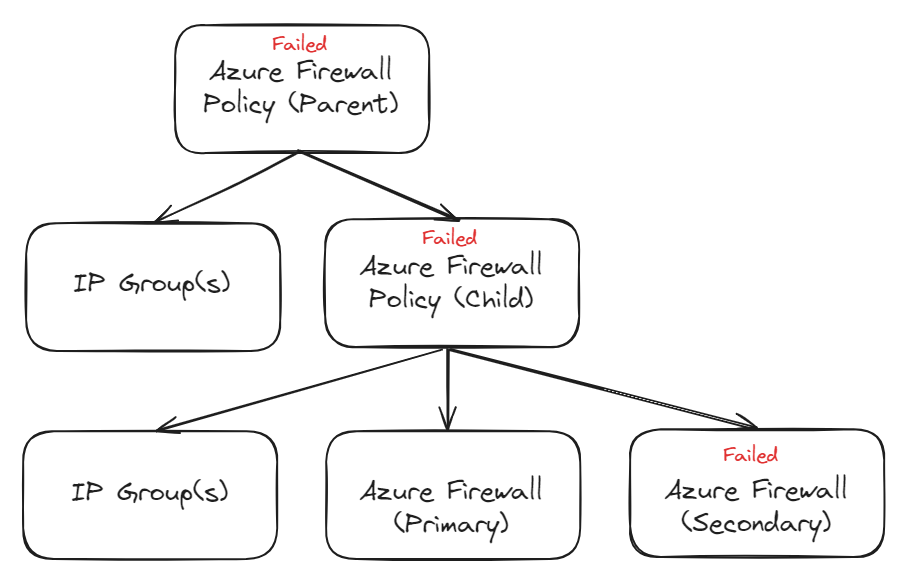
They couldn’t deploy changes to some of the IP Groups referenced by the Parent Azure Firewall Policy because it had a Failed provisioning state, which was because the Child Azure Firewall Policy had a Failed provisioning state, which in turn was because the Secondary Azure Firewall had a Failed provisioning state.
We resolved the situation by doing the following:
- Perform a PUT operation on the Secondary Azure Firewall
- Perform a PUT operation on the Child Azure Firewall Policy
- Perform a PUT operation on the Parent Azure Firewall Policy
The lesson here is that you will need to check all resources in the dependency chain before you perform any of the PUT operations. If you perform the PUT operations in the wrong order then they will fail.
Conclusion
I hope this helps someone that experiences the same issue.
As always, if you think there is a better way this could’ve been fixed then please leave a comment below.