
Object ID is not authorized to register Azure resource provider
If you receive this error when trying to deploy some changes to Azure, you would be forgiven for thinking, “That looks like a Resource Provider hasn’t been registered on a Subscription, but my Service Principal has permissions to do that…so why didn’t it work?!”
Well, you would be right…and wrong. Let me explain.
Not authorized to do what?
I had this issue recently when I was trying to use Terraform to create a Private Endpoint on an Azure Key Vault to a Virtual Network Subnet that was located in a different Subscription.
Here’s the error from my Azure DevOps pipeline run.
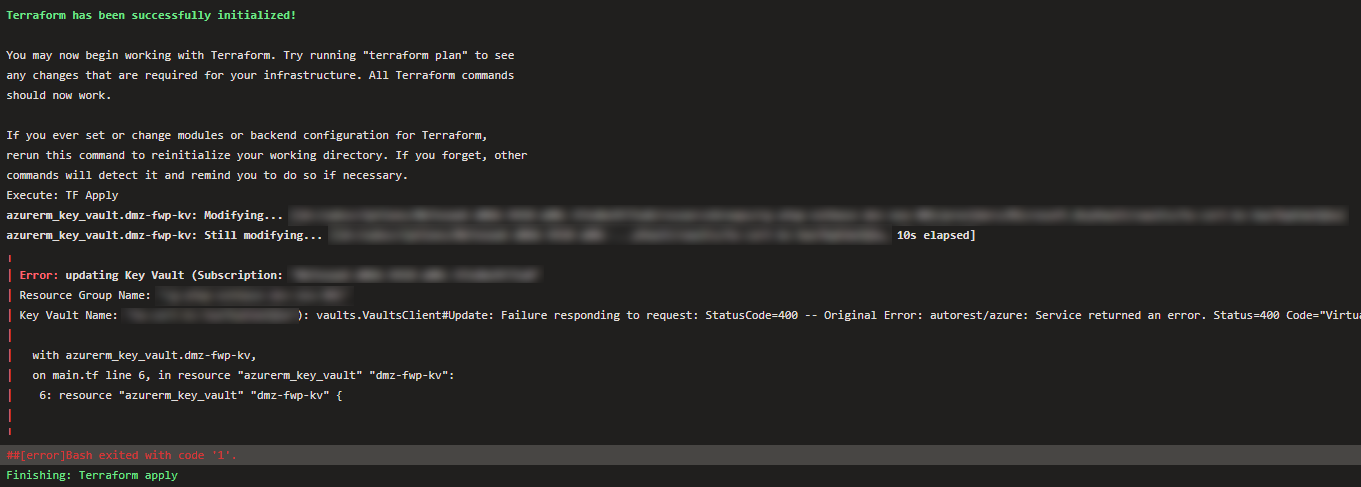
The error was;
The client ‘’ with object id ‘’ does not have authorization to perform action ‘microsoft.network/virtualnetworks/taggedTrafficConsumers/validate/action’ over scope ‘/subscriptions/ /resourcegroups/ /providers/microsoft.network/virtualnetworks/ /taggedTrafficConsumers/Microsoft.KeyVault.northeurope’ or the scope is invalid. If access was recently granted, please refresh your credentials."
What’s the cause of this?
After a bit of Googling (or Binging?) I worked out that “/validate/action” authorization is required to register a Resource Provider in a Subscription.
Since I was working with two resource types - Virtual Networks and Key Vaults - I checked both Subscriptions, and discovered that the Subscription containing the Virtual Network did NOT have the “Microsoft.KeyVault” Resource Provider registered.
BUT….
The Service Principal being used by the Service Connection had the correct RBAC permissions on both Subscriptions, i.e. Contributor, which should be enough to register a missing Resource Provider.

You must have permission to do the /register/action operation for the resource provider. The permission is included in the Contributor and Owner roles.
Unfortunately, that will only work if you have Terraform code that is directly trying to manage a resource in a target Subscription.
In my scenario, I was setting the Private Endpoint subnet_id attribute with the Virtual Network subnet located in a different Subscription.
So, how do I fix it?
There are two solutions to this:
- Add code that will explicitly register the required Resource Provider in the target Subscription, e.g
resource "azurerm_resource_provider_registration" "example" {
    name = "Microsoft.KeyVault"
    alias = provider.other_subscription
}- If you have the permissions then manually register the Resource Provider yourself on the required Subscription.
Conclusion
I hope this helps someone that experiences the same issue.
As always, if you think there is a better way this could’ve been fixed then please leave a comment below.